How to write meeting minutes with AI
What good meeting minutes contain, and how to get them from a recording with AI: decisions, action items with owners and open questions, checked and sent in minutes.
Last updated 29 October 2026
Meeting minutes are the short written record of a meeting: who was there, what was decided, who does what next, and what is still open. Written by hand they take half an hour after every meeting. With a recording and AI, the first draft is ready minutes after the call, and your job is to check it.
What good minutes contain
Whatever the tool, minutes people actually read have the same parts:
- The basics: the meeting’s title, date and length, and who attended.
- A short overview: two or three sentences on what the meeting was about.
- Decisions: what was agreed, one line each. This is the part people come back to.
- Action items: what has to happen, who owns it, and by when if a date was named.
- Open questions: what was raised but not settled, so it is on the next agenda.
What they leave out matters as much: no transcript of the discussion, no who-said-what for every point. That is what the recording and the transcript are for.
Get the minutes from a recording
- Record the meeting. With Muvero’s Chrome extension, press Record this meeting on Google Meet, Zoom, Microsoft Teams, Webex, Whereby, Jitsi or GoTo; no bot joins the call. For a meeting in a room, record it on a phone and upload the file.
- Pick the language of the minutes. By default they are written in the meeting’s language. A meeting in Serbian can get its minutes in English for a team abroad, or the other way round.
- Wait a few minutes. When the call ends, the recording is transcribed with the speakers by name, and the recap follows by email: the overview, the decisions, the action items with owners and the open questions. The attendees are listed from the names the call showed.
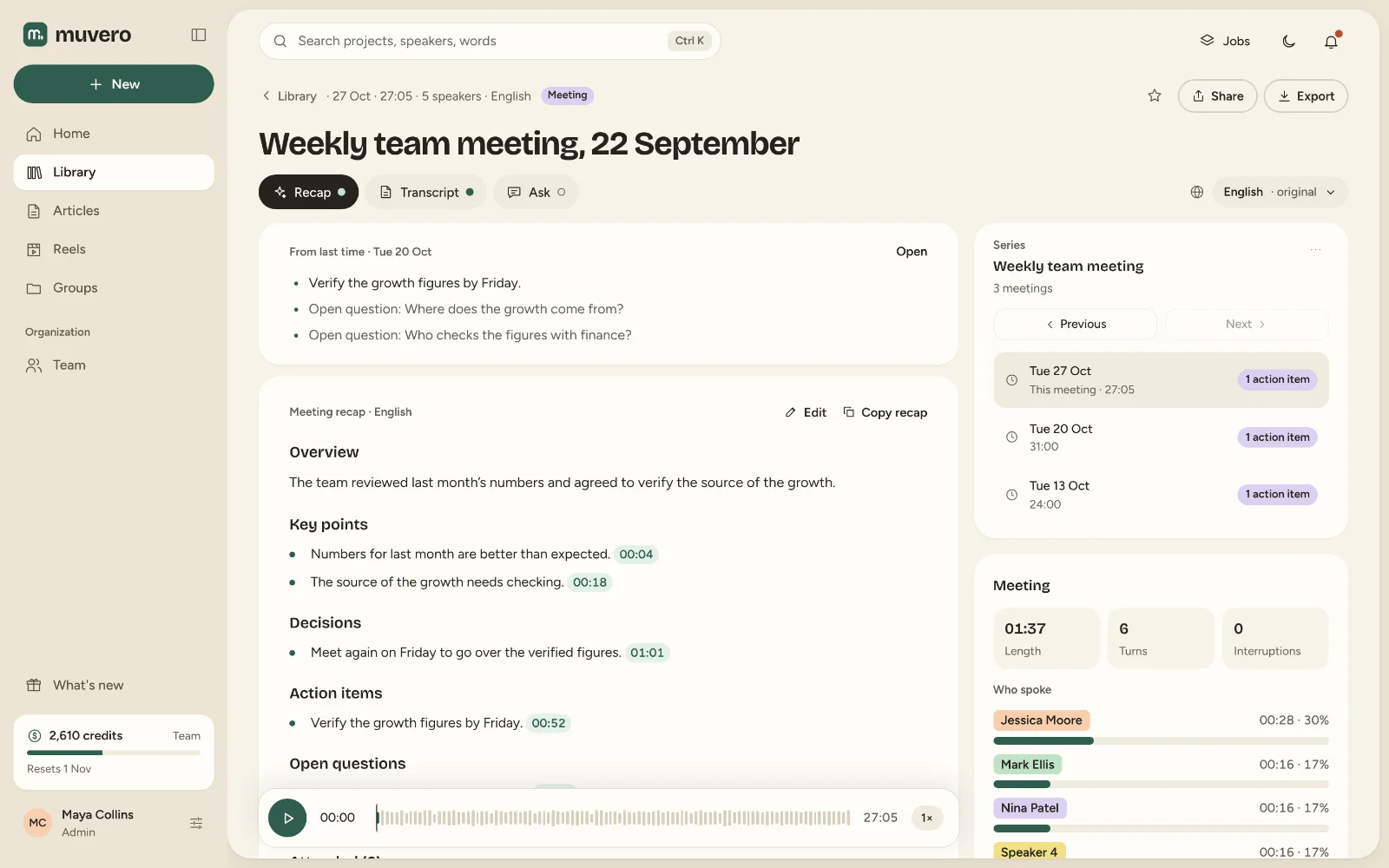
Check before you send
AI gets the structure right; a person still checks the facts. Read the draft once with these questions:
- Are the decisions really decisions? “We should look at prices” is not the same as “Prices go up in May”. Remove anything that was only discussed.
- Does every action item have an owner? If the meeting didn’t name one, add it or move the item to the open questions.
- Are the names and numbers right? Click a point to hear the moment it comes from, and fix what was misheard.
- Is anything confidential? Minutes travel further than the meeting. Take out what should not.
Then send it: to everyone who attended, to a few people, or only to yourself. The full transcript stays in your library for anyone who needs more than the minutes.
A template you can copy
If you write minutes by hand, or want to check an AI draft against a fixed shape:
Meeting: Weekly planning, 21 October 2026, 33 minutes
Attended: Ana, Marko, Nina, Tom

Overview
One or two sentences on what the meeting was about.

Decisions
- Episode 49 goes out on Friday.

Action items
- Book the guest for episode 50 (Ana, by Wednesday)

Open questions
- Do we film episode 50 in the studio?
Every recap Muvero writes follows this outline. AI meeting notes shows how it works on Meet, Zoom and Teams, and the AI note taker page explains recording without a bot in the call.